
Anthropic’s Cowork Review 2026: The AI Desktop Agent That’s Changing How We Work
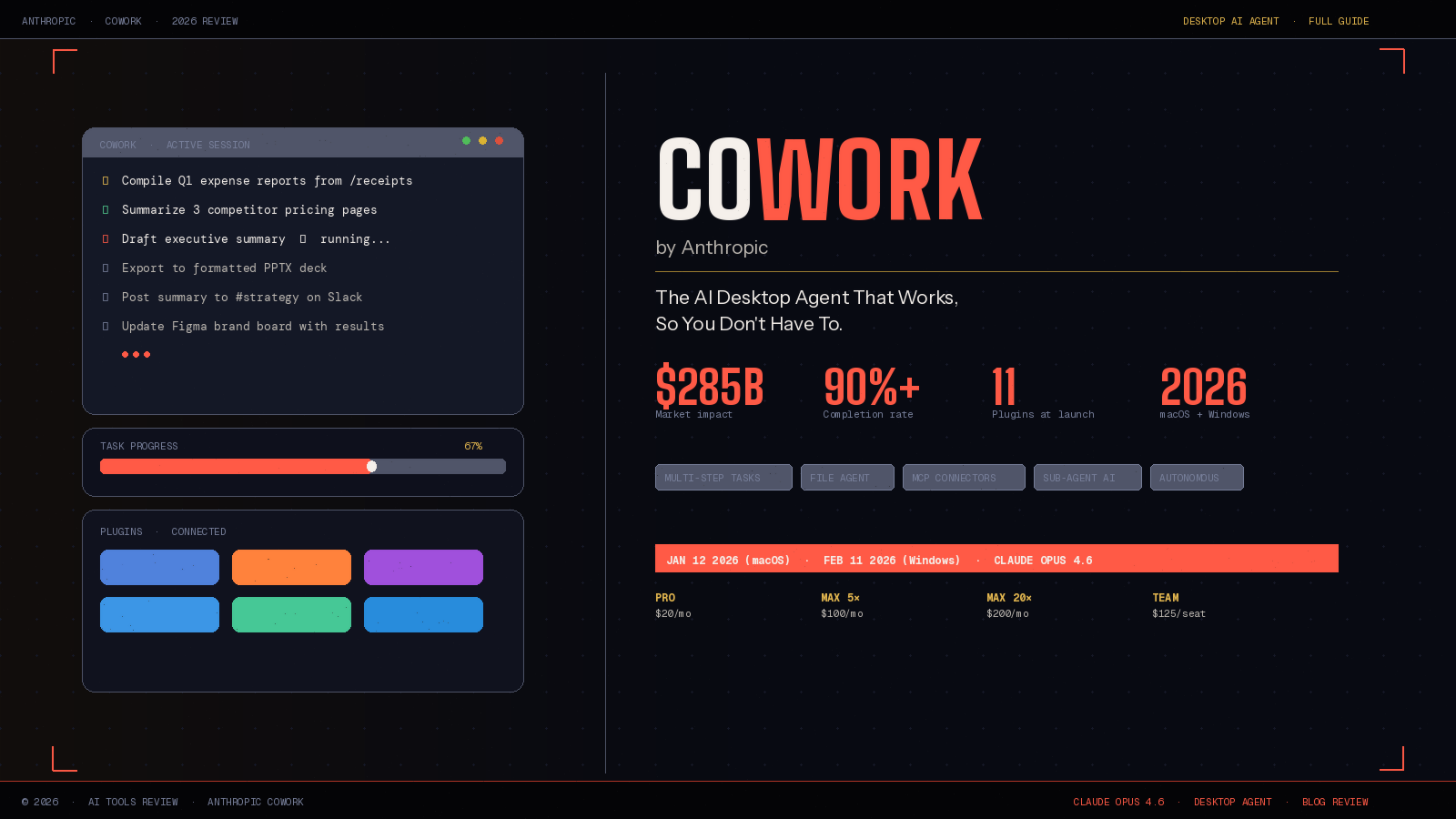
Something fundamental shifted in January 2026. Anthropic didn’t release a chatbot update or a new API endpoint — it released Cowork, a desktop AI agent that doesn’t wait to be asked questions. Instead, it takes on tasks. It reads your files, executes multi-step workflows, connects to your tools, and delivers finished work — autonomously.
In the weeks since launch, Anthropic’s Cowork has triggered a $285 billion selloff in enterprise software stocks, earned a strategic partnership with Microsoft, and forced every major SaaS company to rethink its roadmap. That’s not a hyperbolic product review — that’s what the market is actually pricing in right now.
This is the complete guide to what Anthropic’s Cowork is, how it works, who it’s for, what it costs, and what it means for the future of knowledge work.
What Is Anthropic’s Cowork? The AI Agent That Does, Not Just Answers
Anthropic’s Cowork is a desktop AI agent built into the Claude Desktop application, available on both macOS and Windows. It’s the tool Anthropic describes as “Claude Code for the rest of your work” — taking the same powerful agentic architecture that made Claude Code a hit among software developers and making it accessible to anyone with a computer, regardless of technical background.
The distinction that matters: Cowork doesn’t have a conversation with you. It works for you. You assign it a task — “compile this month’s expense reports from the receipts folder,” “research three competitor websites and summarize their positioning,” “organize these 400 photos by date and subject” — and it plans, executes, and delivers. You return to finished work.
The genesis of Cowork came from an unexpected pattern Anthropic noticed among Claude Code users. Engineers at Anthropic observed people using the developer tool for an unexpectedly diverse array of non-coding tasks: vacation research, building slide decks, cleaning up email, cancelling subscriptions, recovering wedding photos from a hard drive, monitoring plant growth, even controlling a smart oven. The underlying agent was clearly capable of far more than writing code — Anthropic just hadn’t given non-technical users a front door.
Cowork is that front door.
How Anthropic’s Cowork Works: The Architecture Behind the Agent
Understanding what makes Anthropic’s Cowork feel different from other AI tools requires a look under the hood.
Cowork operates through a folder-permission model: users grant the AI read, write, and create access to specific directories. The result is similar to a sandboxed instance of Claude Code, but requires far less technical knowledge to set up. You point it at a folder, set your instructions, and Cowork gets to work — no command line, no virtual environments, no developer configuration required.
The system runs within a virtual machine using Apple’s Virtualization Framework, providing isolation from the host operating system. Its architecture implements sub-agent coordination for parallelizable tasks — when presented with independent subtasks, Cowork spawns multiple Claude instances that execute concurrently and aggregate results, reducing total execution time for complex operations compared to sequential processing.
The tool integrates with Agent Skills, Anthropic’s open standard for modular AI capabilities, with specialized handling for office file formats including XLSX, PPTX, DOCX, and PDF. This means Cowork doesn’t just move files around — it understands their contents, edits them intelligently, and produces professionally formatted outputs.
Perhaps the most striking technical footnote: Anthropic built Cowork in approximately a week and a half, largely using Claude Code itself — a recursive feedback loop where AI tools are being used to build better AI tools.
Anthropic’s Cowork Features: What It Can Actually Do
The feature set of Anthropic’s Cowork spans four major capability areas, each of which individually would be a meaningful AI product. Together, they form something that feels qualitatively new.
Multi-Step Task Execution. The core capability. Cowork doesn’t need hand-holding through each step of a task. It plans, sequences, and executes autonomously — breaking a complex request like “prepare a competitive analysis of these five companies” into research, summarization, formatting, and delivery without prompting.
File Access and Management. Cowork reads, edits, creates, and organizes files within the folder you designate. Anthropic gives the example of assembling an expense report from a folder of receipt photos — but users have also put the system to work managing media files, scanning social media posts, and analyzing conversations.
Plugins for Specialized Workflows. Anthropic launched plugin support on January 30, 2026, with 11 open-sourced starter plugins covering key business functions: productivity and task management, enterprise search across company tools, marketing content and campaign planning, and sales research and deal preparation. Custom plugins are described as easy to build, edit, and share, and can be deployed without technical expertise.
MCP Connectors and App Integrations. Cowork connects to external services through the Model Context Protocol (MCP). Anthropic has launched integrations with Slack, Canva, Figma, Box, and Clay, with a Salesforce implementation coming soon. Combined with Cowork’s file access, these integrations mean the agent can update a marketing graphic in Figma, pull data from Box, or post a summary to a Slack channel — all within a single task run.
Persistent Instructions. Users can set global and folder-specific instructions that Claude follows in every session — meaning Cowork learns your preferences, your workflow conventions, and your style requirements over time, without you having to repeat them.
Anthropic’s Cowork Pricing: What It Costs in 2026
Anthropic’s Cowork is included in paid Claude plans, but the reality of pricing requires some nuance — because Cowork tasks consume significantly more usage quota than standard chat.
Cowork is available across four plans: Pro at $20/month with limited usage; Max 5x at $100/month with approximately 225 or more messages per 5-hour rolling window; Max 20x at $200/month with approximately 900 or more messages per 5-hour window; and Team Premium at $125 per seat per month.
The honest limitation: the most common complaint from power users is usage limits. Even on the $200/month Max 20x plan, intensive Cowork sessions can exhaust the quota surprisingly quickly. Professionals who plan to rely on Cowork throughout an entire workday should factor this into their tier decision.
For enterprise buyers, there’s a significant caveat for now: Cowork activity is not captured in Audit Logs, Compliance API, or Data Exports, which makes it unsuitable for regulated workloads until Anthropic addresses this gap. Plugin management is also currently local-only — administrators cannot centrally provision or manage plugins across their organization, though Anthropic has indicated org-wide sharing is in development.
Anthropic’s Cowork vs. Microsoft Copilot and Google Gemini: How It Compares
The AI productivity tool landscape in 2026 has three serious contenders for the “AI work agent” position: Anthropic’s Cowork, Microsoft Copilot, and Google Gemini. Here’s how they stack up.
Anthropic’s Cowork vs. Microsoft Copilot: Copilot is deeply integrated into Microsoft 365 — Word, Excel, PowerPoint, Teams, Outlook — which gives it unmatched native utility for organizations living inside that ecosystem. Cowork operates at the operating system level with folder access, which makes it more flexible but requires more setup. Crucially, Microsoft has begun encouraging thousands of employees across its most prolific teams to adopt Claude Code — and by extension, Cowork — even those with no coding experience, signaling that Microsoft itself views Cowork’s underlying architecture as complementary to its own tools.
Anthropic’s Cowork vs. Google Gemini: Google Gemini is tightly integrated into Google Workspace — Docs, Sheets, Gmail, Drive — making it the natural choice for Google-first organizations. Cowork doesn’t have native Workspace integrations yet, but its cross-platform local file access gives it capabilities that cloud-native tools can’t match for users who work with large local datasets or sensitive files that can’t live in the cloud.
Where Cowork wins outright: Task autonomy. Neither Copilot nor Gemini currently matches Cowork’s ability to take a complex, open-ended task and see it through to completion across multiple tools and file types without continued user input. The sub-agent coordination that runs parallel workstreams is a genuine architectural advantage.
Anthropic’s Cowork for Business: Industry Impact and Use Cases
What makes Anthropic’s Cowork particularly significant for businesses isn’t any single feature — it’s the breadth of industries it’s already disrupting.
Legal. Anthropic launched a legal plugin for Cowork targeting workflows for in-house counsel, including contract review, NDA triage, compliance checks, briefings, and templated responses. It’s configurable to an organization’s own playbook and risk tolerances. For legal tech, it landed more like a tsunami than a feature drop — for the first time, a foundation-model company is packaging a legal workflow product directly into its platform, rather than merely supplying an API to legal-tech vendors.
Marketing and Sales. The marketing and sales plugins enable Cowork to draft content, plan campaigns, research prospects, and prep deals — handling the research-heavy, document-intensive workflows that consume hours of team time each week.
Finance. Opus 4.6 — the model powering Cowork — can run financial analyses, perform research, and create documents, spreadsheets, and presentations autonomously within Cowork’s multitasking environment. The model outperforms competitors on GDPval-AA, an evaluation of performance on economically valuable knowledge work tasks in finance and legal domains.
Software Development. While Cowork is positioned for non-technical users, developers can use it alongside Claude Code for a split workflow: Claude Code for precise engineering tasks, Cowork for the surrounding documentation, research, and reporting work that accompanies every engineering project.
Anthropic’s Cowork Safety Considerations: What to Know Before You Start
Anthropic is notably transparent about Cowork’s risk profile — which is worth understanding before granting an AI agent broad access to your file system.
In a blog post announcing the tool, Anthropic explicitly warns about the risk of prompt injection or deleted files, recommending that users make instructions as clear and unambiguous as possible. “These risks aren’t new with Cowork,” the post reads, “but it might be the first time you’re using a more advanced tool that moves beyond a simple conversation.”
Anthropic’s safety documentation encourages users to monitor the agent closely and not grant unnecessary permissions. “Be cautious about granting access to sensitive information like financial documents, credentials, or personal records,” the company recommends. “Consider creating a dedicated working folder for Claude rather than granting broad access.”
Early users have reported occasional bugs — including API connection failures on Windows 11 Home and the Cowork tab disappearing after restarts. These are expected for a research preview product and will likely resolve as the platform matures, but they’re worth knowing about if you’re considering integrating Cowork into mission-critical workflows today.
The practical guidance: start with a dedicated, non-sensitive working folder. Use Cowork for lower-stakes tasks first, observe its decision-making, and expand its permissions incrementally as you build confidence in its judgment for your specific workflows.
The Bigger Picture: What Anthropic’s Cowork Means for the Future of Work
The reaction to Anthropic’s Cowork from the investment community was telling. Within days of the macOS launch in January, investors began repricing SaaS companies whose products overlap with Cowork’s capabilities — project management tools, writing assistants, data analysis platforms, and workflow automation software all saw sharp declines. Bloomberg reported that Cowork triggered a $285 billion software stocks selloff.
That reaction reflects a genuine insight: an AI agent that can autonomously execute the tasks these tools were designed to help humans do is a structural threat to their value proposition — not because it’s perfect, but because it’s getting better fast. Anthropic raised its 2026 revenue forecast by 20% to $18 billion in January 2026, with revenue more than doubling to a $9 billion run rate by year-end 2025. The company is not operating from a position of experimentation — it’s operating from a position of accelerating product-market fit.
For knowledge workers, the near-term reality is more nuanced than the market panic suggests. Cowork doesn’t replace judgment, relationships, strategy, or creativity. What it does replace is the execution overhead that surrounds those things — the research, the formatting, the file organization, the first drafts, the repetitive document processing. And for professionals who can redirect that reclaimed time toward higher-leverage work, Cowork isn’t a threat. It’s a force multiplier.
Key Takeaways: Anthropic’s Cowork at a Glance
- Launched January 12, 2026 on macOS; Windows launch with full feature parity on February 11, 2026
- Built on Claude Opus 4.6, currently the highest-performing AI model on complex knowledge work benchmarks
- Operates through a sandboxed folder-permission model with virtual machine isolation
- Executes multi-step tasks autonomously, including parallel sub-agent workflows
- Plugins available for legal, marketing, sales, productivity, and enterprise search
- Integrates with Slack, Canva, Figma, Box, and Clay via MCP connectors
- Pricing: $20/month (Pro) to $200/month (Max 20x), with Team plans at $125/seat
- Not yet suitable for regulated enterprise workloads lacking audit log support
- Microsoft has encouraged adoption internally across engineering and business teams
- Triggered $285 billion SaaS market selloff upon macOS launch